Now in invite-only beta · request an invite

See when an attacker is moving through your Windows network

Arden reads the event logs your Windows servers and PCs already keep and alerts you to signs of an attack, such as stolen credentials, lateral movement and cleared logs. It can also show auditors which logging their HIPAA, PCI DSS, CMMC or CJIS requirements depend on. It runs on your own server, and your logs stay on your network.

See the Product Line Use Cases
ARDEN Security
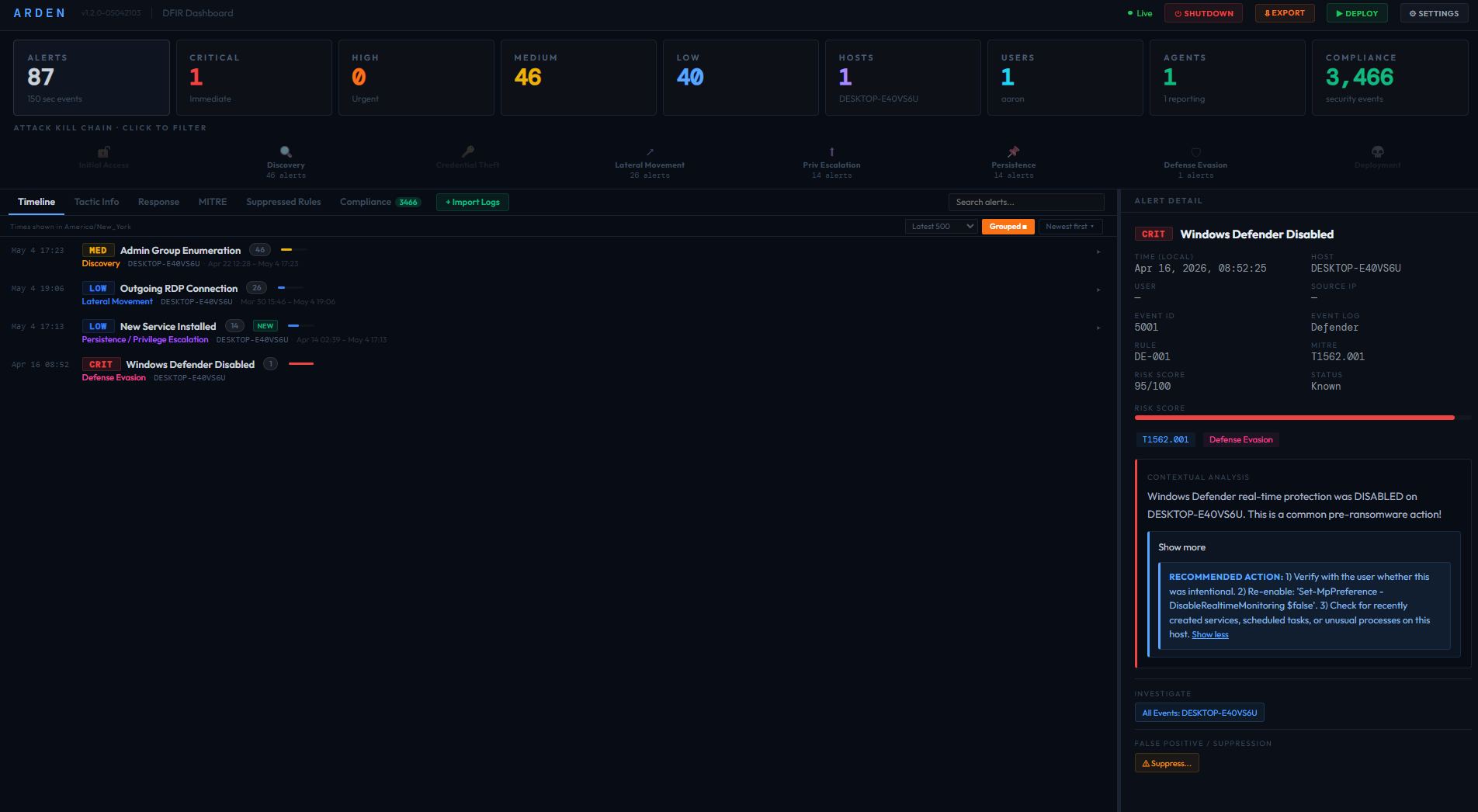
Alerts on attacker activity such as credential theft, lateral movement and privilege escalation, mapped to MITRE ATT&CK.
ARDEN Comply
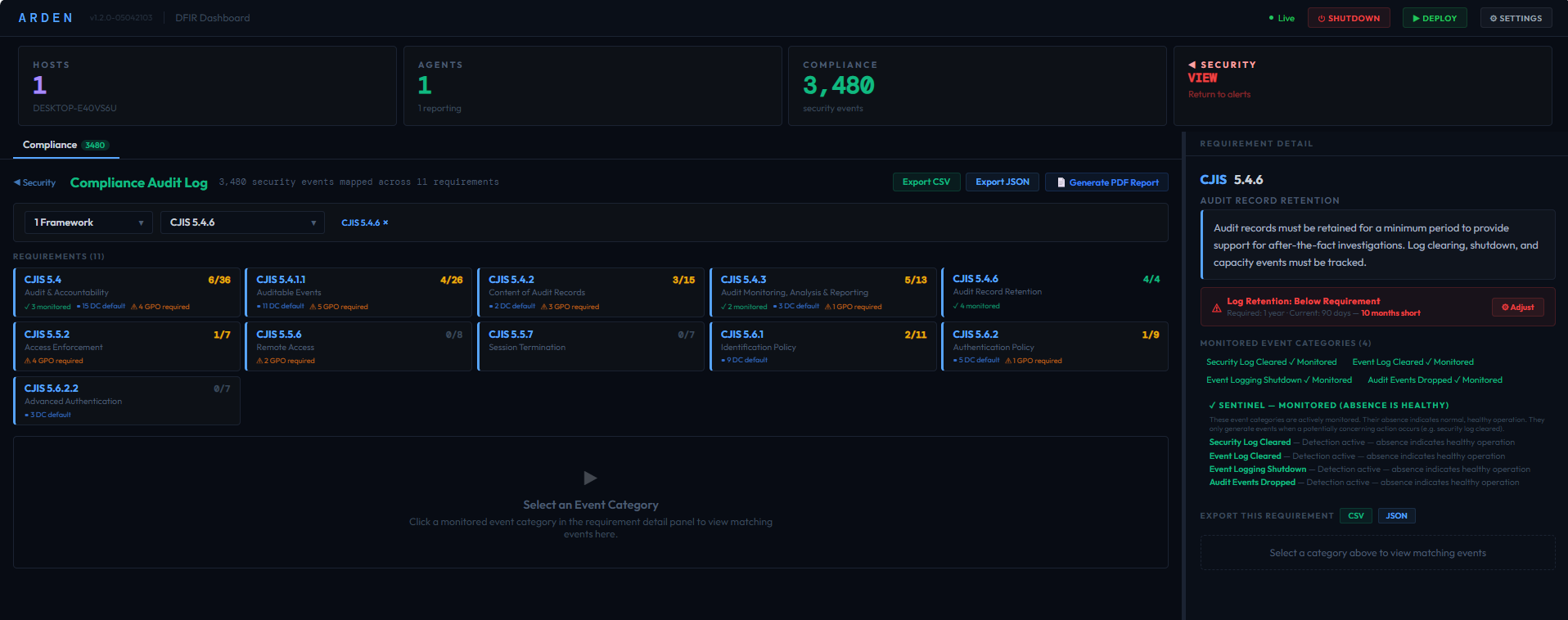
Shows which logging each requirement in seven compliance frameworks depends on, and where it's missing. Exports to PDF, CSV and JSON.
ARDEN Complete
Both of the above in one dashboard, so alerts and logging evidence are in the same place.
Each product available as Standalone (single machine) or Network (multi-host with agents)
The beta includes the Network edition with both threat detection and audit-log coverage reporting.
Arden Security Dashboard showing real-time threat detection with MITRE ATT&CK mapping, alert severity breakdown, and contextual analysis
Arden Compliance Dashboard showing CJIS framework coverage with per-requirement scoring, monitored event categories, and GPO configuration guidance

Choose detection, compliance reporting, or both

All three editions are the same program, and your license decides which features are turned on. You can run it on a single machine, or install it on a server and deploy agents to the rest of your network.
ARDEN
Security

Checks Windows event logs as they arrive and alerts on lateral movement, credential theft, persistence and privilege escalation. Each rule is mapped to MITRE ATT&CK.

▸MITRE ATT&CK mapped rules
▸Sigma rule support
▸Compound risk scoring
▸False positive triage
▸Real-time SSE dashboard
▸Email & webhook alerting
▸One-click agent deployment
Standalone — single machine analysis
Network — deploy agents, monitor everything
See Detection Coverage
ARDEN
Comply

Maps Windows event activity to 133 requirements in seven frameworks, so you can see which of the logging auditors ask about is in place and which isn't.

▸133 requirements across 7 frameworks
▸CJIS • HIPAA • PCI DSS • CMMC • NIST 800-171 • SOX • FERPA
▸56 monitored event categories
▸CSV & JSON evidence export
▸Per-host, per-requirement detail
▸One-click PDF audit-log coverage reports
Standalone — audit one machine
Network — centralized evidence, all hosts
See Compliance Coverage
Best Value
ARDEN
Complete

Includes everything in Arden Security and Arden Comply. Alerts and logging evidence sit in the same dashboard, which helps when an incident turns into an audit question.

▸All Arden Security features
▸All Arden Comply features
▸Unified dashboard — one view
▸Security alerts + compliance evidence
▸Same single executable
Standalone — full platform, one machine
Network — full platform, entire environment
Request a Beta Invite

What Arden looks for

Arden's rules cover common Windows attack techniques across eight MITRE ATT&CK tactics, from password theft to the steps attackers take before deploying ransomware. Routine Windows activity is filtered out before an alert is raised.

We test each build against EVTX-ATTACK-SAMPLES, a public collection of 278 recorded attacks. The current build raises at least one alert on 233 of them (84%). About half of the rest leave no trace in the logs Arden collects, which is why we say Arden detects many attacks, not all of them.

Discovery Execution Persistence Privilege Escalation Defense Evasion Credential Access Lateral Movement Impact
See Full Detection Coverage →

Setting up Arden on your network

1
Install it on a Windows server

Run the Arden executable on a Windows server you control. There is nothing else to install, and the dashboard opens in your browser.

2
Add the machines you want to watch

Scan your network from the dashboard and deploy the Arden agent to the servers and PCs you pick. Agents send event logs to your Arden server and nowhere else.

3
Review alerts and reports

Alerts appear in the dashboard and can be sent by email or webhook. Audit-log coverage reports export to PDF, CSV and JSON.

What an alert tells you

Each alert explains what was seen, on which machine, and why it can matter, so you don't have to decode raw event IDs yourself.
High Lateral Movement · MITRE T1021.002
PsExec-style service installed on FILESRV01

A service named PSEXESVC was installed on FILESRV01 at 2:14 AM. PsExec and similar tools install a service like this to run commands on a machine remotely, and attackers use them to move from one machine to the next. If your admins use PsExec, you can suppress this alert for that use. If not, find out who ran it and from where.

Based on: System event 7045 (a service was installed)

Example for illustration, based on Arden rule LM-002. The host name and time are made up.

What Arden does, and what it doesn't

Arden does
  • ✓Read the Windows event logs on the machines you add
  • ✓Alert you to activity that matches known attack techniques
  • ✓Show which logging each compliance requirement depends on, and where it's missing
  • ✓Keep everything on your own server, with no cloud service and no telemetry
Arden doesn't
  • ✕Block, quarantine or stop anything. Keep your antivirus or EDR running alongside it.
  • ✕See activity that Windows doesn't write to its logs
  • ✕Catch every attack. No alert doesn't mean no attack.
  • ✕Decide whether you are compliant. That's your auditor's call.

When IT is also the security team

Arden is meant for organizations with Windows servers and PCs but no security operations team, usually somewhere between 10 and 500 machines looked after by one IT person, a small team, an MSP or an MSSP. It's a particularly good fit for these:
Medical and dental practices
HIPAA requires audit controls; Arden shows which Windows logging they rely on
Defense contractors
CMMC assessments check NIST 800-171 audit logging; your logs stay on site
Police departments and local government
CJIS requires audit logging, and there's no cloud service for your agency to approve
Schools and districts
Small IT staff, many machines, and student records to protect under FERPA
Retailers and anyone taking cards
PCI DSS Requirement 10 calls for logging of access to cardholder systems
Public companies and their suppliers
SOX IT general controls call for logging of access and changes
MSPs and MSSPs
One Arden server per client site, so each client's logs stay with that client

Pricing will be announced at launch

Arden will be priced at a flat monthly rate based on the size of your environment, with no per-GB ingest fees. Beta testers hear about pricing first and get a discount on their first year.
Security — Standalone
Single-machine analysis
✓ Native detection rules + Sigma support
✓ Real-time dashboard
✓ EVTX/JSON/XML import
✓ CSV & JSON export
✓ Alert triage & suppression
✓ Fully offline — no cloud
Request a Beta Invite
Multi-Host
Security — Network
Everything in Standalone, plus:
★ Multi-host agent deployment
★ Network discovery (CIDR scan)
★ Active Directory integration
★ Remote log collection (agent or WinRM)
★ Agent health monitoring
★ Centralized multi-host dashboard
Request a Beta Invite

Articles for Windows administrators

Guides on reading Windows event logs, spotting common attacks and preparing for log-related audit questions.
Industry News

Blumira Free and Graylog SMB are gone. Now what?

August 17, 2026

Two of the most accessible security monitoring options for small teams disappeared in the last eight months. Here’s what changed, and where Arden fits.

Read article →
SIEM Pricing

The $5,000/month SIEM bill you didn’t see coming

August 12, 2026

Per-GB pricing is just the start. Overage charges, tuning labor, analyst salaries, and compliance mandates make traditional SIEMs 2–3x more expensive than the quote — and hit hardest at the SMBs that can’t opt out.

Read article →
Server Security

Every attack touches a server. Are you watching yours?

May 5, 2026

EDR misses 79% of today’s attacks because they’re malware-free. RDP abuse appears in 90% of ransomware cases. A flat-rate SIEM on your servers closes the gap most teams don’t know they have.

Read article →
Compliance

How to prepare for a compliance audit using your Windows event logs

April 21, 2026

HIPAA, PCI DSS, CMMC, CJIS — they all require log monitoring. Here’s how Arden Comply maps Windows events to framework controls and generates PDF reports to help organize your evidence.

Read article →
SIEM Pricing

SIEM pricing in 2026: what small IT teams actually pay

April 14, 2026

Splunk, QRadar, Sentinel, and Elastic — what they actually cost for a 50-endpoint Windows shop. Plus why per-GB billing punishes small teams, and the flat-rate alternative.

Read article →
Credential Theft

Detecting LSASS credential dumps in Windows event logs

March 31, 2026

After landing on a machine, attackers dump LSASS to steal credentials. Here's how to catch Mimikatz, comsvcs.dll, ProcDump, and registry SAM extraction using native Windows events.

Read article →
SMB Security

The lightweight alternative to a six-figure SIEM

March 17, 2026

Enterprise security tools assume enterprise budgets. Here's how small IT teams can get real threat detection coverage with native Windows logs, open rules, and a single executable.

Read article →
Incident Response

How to spot lateral movement without a SOC

March 3, 2026

When an attacker lands on one machine, they move to others. Here's how to read the trail they leave in Windows event logs — PsExec, WMI, RDP, and pass-the-hash artifacts explained.

Read article →
Threat Detection

5 Windows Event IDs every system administrator should be monitoring

February 17, 2026

You don't need a SIEM to catch the most common attacks. These five event IDs cover brute force, lateral movement, privilege escalation, and credential theft — and they're already in your logs.

Read article →

Request a beta invite

Arden is in invite-only beta. Leave your work email and we'll contact you about a two-week beta license. Beta testers get a discount on their first year.

Windows 10/11 • Server 2016+ • x64 • No runtime required

Why the name?

Named after the Ardennes — the forested region where Allied defenders held the line against a massive offensive in the winter of 1944. Arden won't stop an attacker on its own, but it can show you what happened, how far they got and where to look next.