SIEM pricing in 2026: what small IT teams actually pay
If you look after somewhere between 20 and 200 Windows machines and have priced a SIEM, you have probably run into per-GB ingestion pricing. It can make monitoring your security logs cost more than the servers that produce them. A 50-machine environment with a couple of domain controllers writes roughly 5–15 GB of logs per day. When each gigabyte is billed, the obvious way to control cost is to collect less, and the logs that get dropped tend to be the ones you would need during an investigation.
Typical costs for the larger SIEMs
Estimated costs for a 50-endpoint Windows environment ingesting about 10 GB per day:
| Platform | Pricing Model | Est. Monthly Cost | Annual Cost |
|---|---|---|---|
| Splunk Enterprise | Per GB/day ingestion | $1,500 – $4,000 | $18,000 – $48,000 |
| IBM QRadar | Per EPS (events/sec) | $800 – $2,500 | $9,600 – $30,000 |
| Microsoft Sentinel | Per GB ingested | $700 – $2,000 | $8,400 – $24,000 |
| Elastic SIEM | Self-hosted (infrastructure cost) | $300 – $1,200 | $3,600 – $14,400 |
| Arden Security | Flat monthly rate, no per-GB fees | Not yet announced | Not yet announced |
Even at this modest scale, the established platforms cost several thousand dollars a year at the low end. Because the price follows data volume, turning on more logging also raises the bill, so more thorough monitoring costs more.
A flat-rate option
Arden’s pricing hasn’t been announced yet. It will be a flat monthly rate based on the size of your environment, with no per-GB ingest fees. Arden runs on a server on your own network and reads Windows event logs directly. Agents send logs only to that server, logs are stored on its local disk, and detection runs on hardware you already own, with nothing sent to a cloud service. Since log volume doesn’t affect the price, you can turn on the audit policies your compliance framework calls for and enable PowerShell script block logging without worrying about the bill.
The detection rules look for activity that often comes before ransomware or data theft, including use of stolen credentials, lateral movement between machines, and persistence mechanisms that survive a reboot. Arden detects many of these attacks, not all of them, and it only raises alerts; it does not block anything. The Network edition brings alerts from multiple servers into one dashboard and can send notifications when something is detected. The server itself is a single executable.
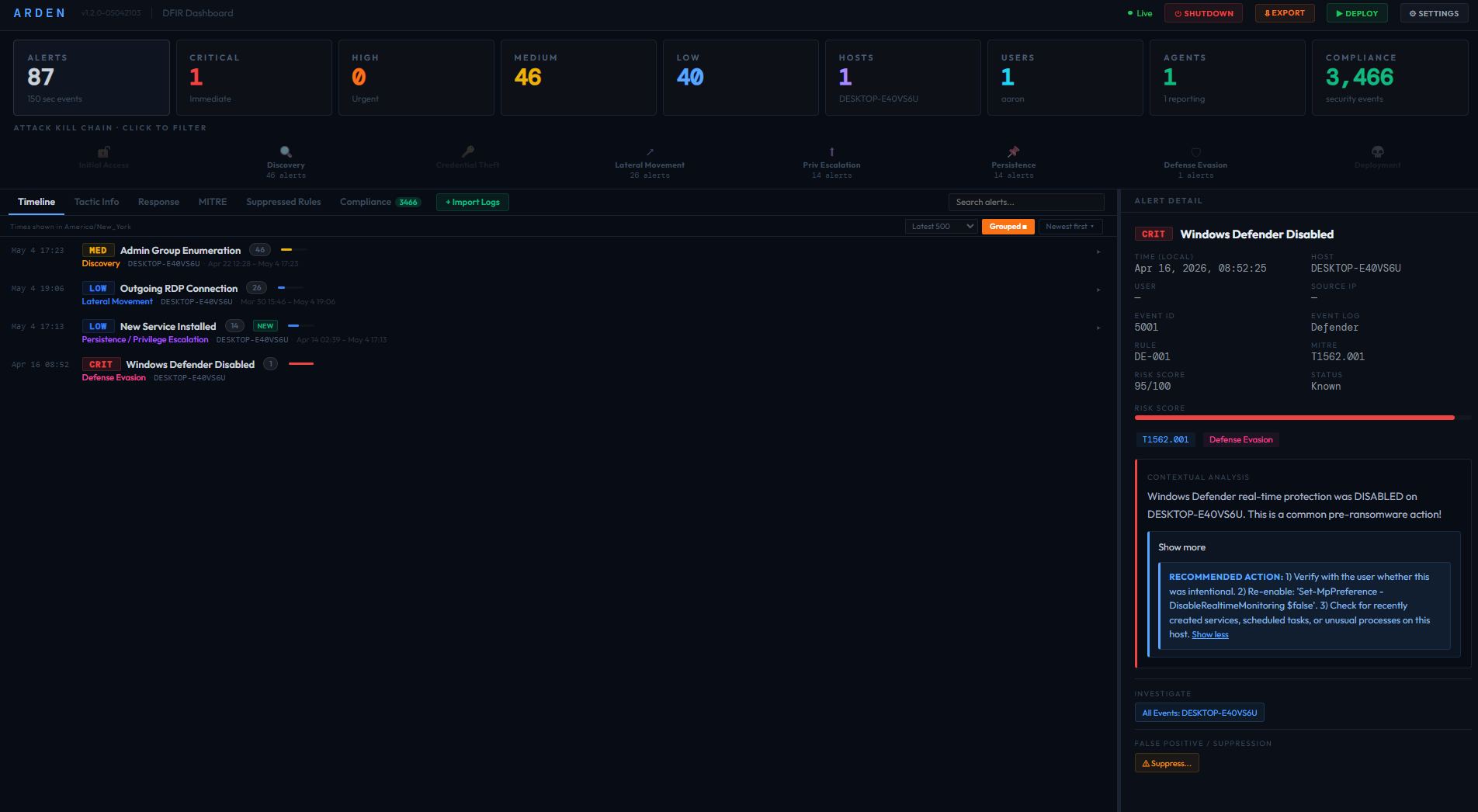
The Arden dashboard groups alerts across endpoints, maps them to MITRE ATT&CK and sorts them by severity.
Start with your servers
Most of the useful evidence of an attack ends up on domain controllers, file servers and systems that hold regulated data. Starting with three to five of those servers puts detection where it is most likely to matter. You can add workstations later if the budget allows.
Arden only handles Windows event logs. If you need Linux syslog, cloud audit trails or correlation across platforms, an enterprise SIEM is the better fit. If your security monitoring today amounts to opening Event Viewer when something seems wrong, Arden is meant for that situation: detection on your Windows logs at a predictable cost. See our detection engine overview, read how Arden detects lateral movement, or learn what the hidden costs of a traditional SIEM actually look like.
Flat-rate security monitoring for Windows
Arden is in invite-only beta. Request an invite to try it on your own network.
Request a Beta Invite